Advanced Cloning Options
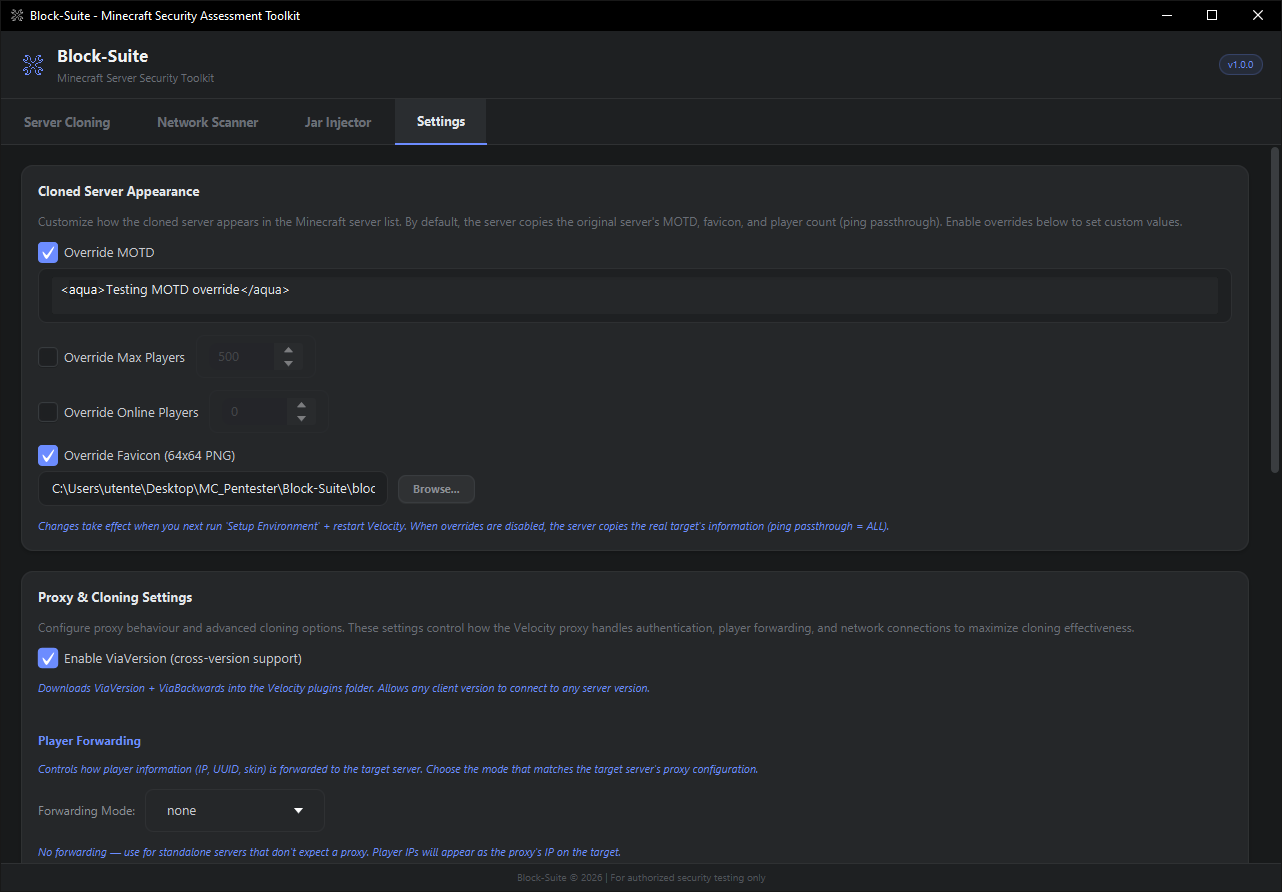
This page explains every advanced proxy and cloning setting available in Settings → Proxy & Cloning Settings. These options control how the Velocity proxy handles authentication, player forwarding, and network connections to maximize cloning effectiveness and bypass potential.
All settings on this page take effect after clicking Setup Environment and restarting Velocity. The proxy reads these values when generating the velocity.toml configuration.
ViaVersion (Cross-Version Support)
| Setting | Default |
|---|---|
| Enable ViaVersion | OFF |
When enabled, Block-Suite downloads two plugins into the Velocity plugins folder:
- ViaVersion — Lets newer Minecraft clients connect to older servers
- ViaBackwards — Lets older Minecraft clients connect to newer servers
Combined, any client version can connect to any server version. This significantly increases the pool of potential "victims" connecting to your cloned server, since they don't need to match the target's exact version.
Enable ViaVersion for maximum compatibility. It's the single most impactful setting for increasing clone effectiveness.
Player Forwarding
Controls how the proxy forwards player information (IP, UUID, skin) to the target server. The correct mode depends on what the target server expects.
Forwarding Mode
| Mode | When to Use | How It Works |
|---|---|---|
none |
Most targets — standalone servers that don't expect a proxy upstream | No forwarding. Player IPs appear as the proxy's IP on the target. Simplest and safest option. |
legacy |
Targets with bungeecord: true in spigot.yml |
BungeeCord-style IP forwarding. Sends player IP + UUID + skin using the legacy protocol. The target thinks players are connecting through a legitimate BungeeCord/Waterfall proxy. |
modern |
Targets configured for Velocity modern forwarding | Velocity's native forwarding protocol. Requires a matching forwarding secret on both the proxy and target. Most secure option — but you need to know the target's secret. |
bungeeguard |
Targets running the BungeeGuard plugin | Adds a security token to legacy BungeeCord forwarding. The target validates the token to prevent IP spoofing. Set the target's BungeeGuard token in the secret field. |
Forwarding Secret
The secret key used for modern and bungeeguard modes. Written to runtime/velocity/forwarding.secret.
- For
modern: must match the target server'sforwarding-secretinpaper-global.yml - For
bungeeguard: must match the BungeeGuard plugin's configured token - For
noneandlegacy: this field is disabled (not used)
If you don't know the target's configuration, start with none. If players get disconnected with "IP forwarding" errors, try legacy. Only use modern or bungeeguard if you know the target's secret key.
Authentication & Security
Online Mode
| Setting | Default |
|---|---|
| Online Mode (Mojang authentication) | OFF |
Controls whether the proxy verifies player accounts with Mojang's authentication servers.
- OFF (default) — Players can join without a premium Minecraft account. This is essential for cloning servers that use auth plugins (AuthMe, etc.) — which is most cracked servers.
- ON — Only premium (paid) Minecraft accounts can connect. Use this only when testing premium-only servers that require it.
Force Key Authentication
| Setting | Default |
|---|---|
| Force Key Authentication (chat signing) | OFF |
Enforces Minecraft's chat message signing system (introduced in 1.19.1). Keep OFF for maximum compatibility, as many servers disable this too.
Prevent Client Proxy Connections
| Setting | Default |
|---|---|
| Prevent Client Proxy Connections | OFF |
When ON, blocks players who are connecting through a VPN or proxy service. Keep OFF for maximum compatibility — you want as many players as possible to be able to connect.
Kick Existing Players
| Setting | Default |
|---|---|
| Kick Existing Players (same username takeover) | OFF |
When ON, if a player joins with the same username as someone already connected, the existing player is kicked and replaced. Useful for session takeover testing — a second connection with the same name takes over the session.
Enabling "Kick Existing Players" can be disruptive. Only enable for specific takeover testing scenarios.
Network & Performance
HAProxy Protocol
| Setting | Default |
|---|---|
| HAProxy Protocol | ON |
Enables the HAProxy PROXY protocol for real IP forwarding. This is used by DDoS protection services like:
- TCPShield
- Cosmic Guard
- OVH Game DDoS Protection
Keep ON if the target is behind such services. Turn OFF if players get disconnected immediately on connect (some servers don't support PROXY protocol).
TCP Fast Open
| Setting | Default |
|---|---|
| TCP Fast Open | OFF |
A network optimization that reduces connection latency by sending data in the initial TCP SYN packet. Requires OS-level support. Generally safe to enable on modern Windows systems.
BungeeCord Plugin Message Channel
| Setting | Default |
|---|---|
| BungeeCord Plugin Message Channel | ON |
Enables the BungeeCord plugin messaging channel (bungeecord:main). Required for servers that use BungeeCord API for cross-server communication (e.g., server switching in networks, shared player data). Keep ON for maximum compatibility.
Compression Threshold
| Setting | Default | Range |
|---|---|---|
| Compression Threshold | 256 | -1 (disabled) to 65,536 |
Minimum packet size (in bytes) before compression is applied. Lower values = more CPU usage but less bandwidth. Set to -1 to disable compression entirely. Default 256 is optimal for most cases.
Login Rate Limit
| Setting | Default | Range |
|---|---|---|
| Login Rate Limit | 3000 ms | 0 to 60,000 ms |
Minimum time between login attempts from the same IP. Set to 0 to disable rate limiting (allows rapid reconnections).
Connection Timeout
| Setting | Default | Range |
|---|---|---|
| Connection Timeout | 5000 ms | 1,000 to 60,000 ms |
How long to wait for the initial connection to the target server before timing out. Increase for high-latency targets.
Read Timeout
| Setting | Default | Range |
|---|---|---|
| Read Timeout | 30000 ms | 5,000 to 120,000 ms |
How long to wait for data from the target server before dropping the connection. Increase for slow or overloaded servers.
Recommended Configurations
Cracked Server (AuthMe / LoginSecurity)
Most common scenario. The target uses an auth plugin and accepts cracked players.
| Setting | Value |
|---|---|
| Online Mode | OFF |
| Forwarding Mode | none |
| ViaVersion | ON |
| Force Key Auth | OFF |
| HAProxy | ON |
| BungeeCord Channel | ON |
BungeeCord Network Server
The target is part of a BungeeCord/Waterfall network and has bungeecord: true in spigot.yml.
| Setting | Value |
|---|---|
| Online Mode | OFF |
| Forwarding Mode | legacy |
| ViaVersion | ON |
| BungeeCord Channel | ON |
| HAProxy | ON |
Velocity Network Server
The target is behind a Velocity proxy with modern forwarding. You need the forwarding secret.
| Setting | Value |
|---|---|
| Online Mode | OFF |
| Forwarding Mode | modern |
| Forwarding Secret | (target's secret) |
| ViaVersion | ON |
Premium-Only Server
The target requires Mojang-authenticated accounts.
| Setting | Value |
|---|---|
| Online Mode | ON |
| Forwarding Mode | none |
| ViaVersion | ON |
| Force Key Auth | Match target's setting |